In short: for following a lecture for free, try Google Translate on your phone or Windows Live Captions if you have a Copilot+ PC. If you also want a transcript, notes and review afterwards, Notta and Compris! both do that. Notta is a subscription that works everywhere; Compris! is Windows only and you pay once.
I made Compris!, so I'm not neutral. I've tried to describe each tool as it is, and I checked prices and features on each company's own pages on 31 October 2026.
My lectures are in French, which isn't my first language. What I need from a tool is simple to say: show me what the professor is saying, translated, while they're saying it. After class, I want to be able to go back to it.
Here are the options I looked at, and when each one makes sense.
Free: Windows Live Captions
Windows 11 can caption any sound playing on your PC, and on some PCs it can translate those captions too.
- Translation needs a Copilot+ PC running Windows 11 24H2 or later. On other Windows 11 PCs you get captions in the original language only.
- It translates into English or Simplified Chinese, from about 40 languages into English and 27 into Chinese.
- Nothing is saved. Microsoft says the captions are not stored on the device or in the cloud, so there is nothing to review after class.
If you have a Copilot+ PC and want English subtitles for an online lecture, this costs nothing and is worth trying first.
Free: Google Translate on your phone
Google Translate's live translation now uses Gemini and translates while the person is still speaking. It supports more than 70 languages. On Android it can keep running in the background, and Google mentions lectures as one of the uses.
It's good for following along. It isn't built for what comes after: there are no lecture notes, summaries or quizzes, and you're reading a phone screen for an hour and a half.
Subscription: Notta
I used Notta for my whole first year, and wrote about it here. It transcribes, translates live and writes AI summaries, and it works on the web, phone and desktop.
- The free plan stops at 3 minutes per recording, so for lectures you need a paid plan.
- Pro is $97.99 a year. Live translation is an add-on on top: $72 a year for translation only, or $108 a year for the version that shows both languages. The add-ons are limited to 100 and 200 uses a month.
- So for live translation in class, you're looking at about $170 to $206 a year, every year.
Subscription: Otter
Otter is a well-known note-taker for meetings. Its free plan includes 300 minutes a month, with up to 30 minutes per conversation, and Pro is $8.33 a month on a yearly plan.
It transcribes English, Spanish, French, German, Japanese and Chinese. Its pricing page doesn't mention translation, so it fits if you understand the language and want a transcript, not if you need the lecture translated.
If your class is on Zoom, Teams or Google Meet
All three can show translated captions, but whether you get them depends on the plan your university or the host pays for, and often an admin has to turn it on. As a student you usually can't switch it on yourself. It's worth checking, since it costs you nothing if it's there.
Compris!
Compris! is a Windows app I built for exactly this. It listens to the lecture through the microphone, or takes the sound from Zoom, Teams or Meet on the PC, and shows each sentence with the translation under it.
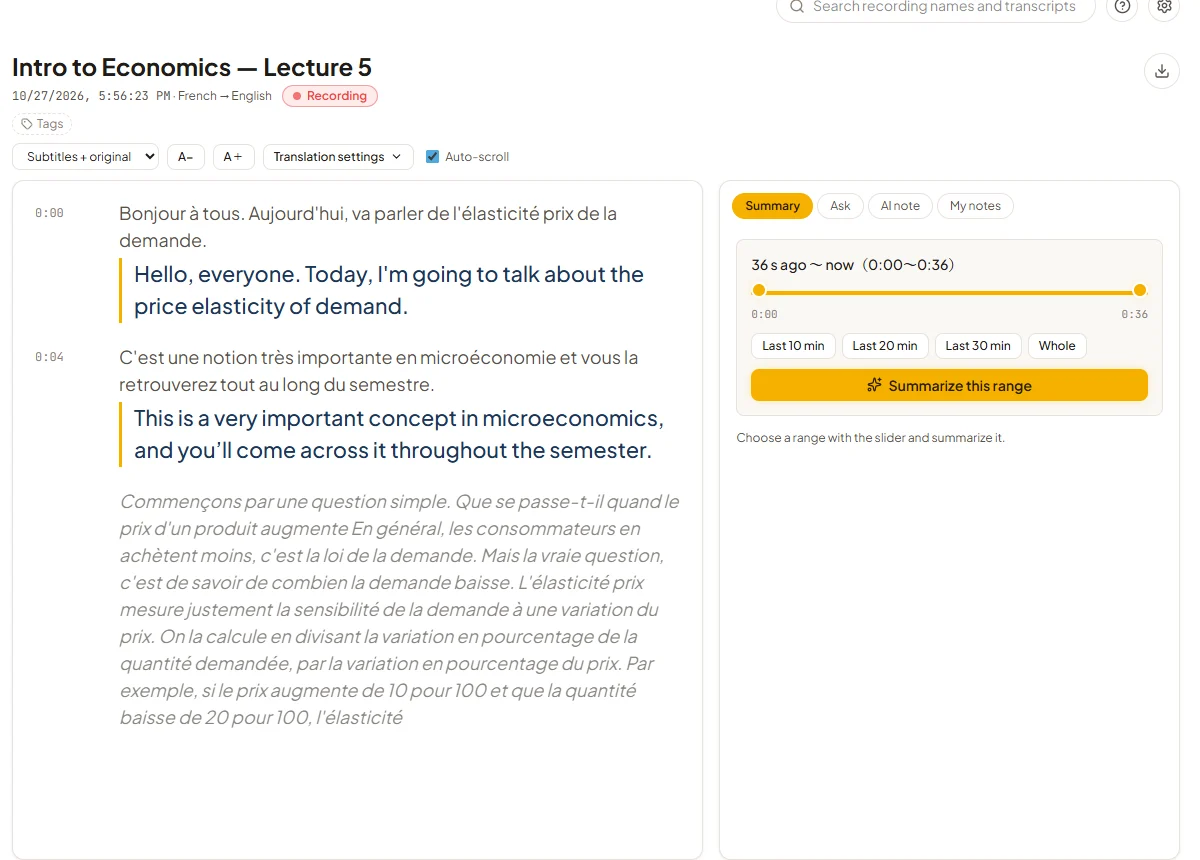
Where it differs from the others is what you can do around the lecture:
- During class, you can summarize the last 10, 20 or 30 minutes, or ask the AI about something you missed.
- After class, you get AI notes, a vocabulary list where you can hear the lecturer say each word, and a short review quiz.
- Recordings stay on your PC.
The trade-offs are real. It's Windows only. It supports seven languages: English, French, Spanish, German, Chinese, Korean and Japanese. And it runs on your own Deepgram and Gemini API keys, which takes about 10 minutes to set up.
On cost: the app is $20 once at the early-bird price, after a 7-day free trial. The AI usage is paid to Deepgram and Gemini. With their free credits, a normal timetable is close to free for the first year, and after that it's roughly $85 a year for 7 to 8 hours of lectures a week.
Side by side
| Price | Live translation in class | After class | Runs on | |
|---|---|---|---|---|
| Windows Live Captions | Free | Copilot+ PCs only, into English or Chinese | Nothing saved | Windows 11 |
| Google Translate | Free | Yes, 70+ languages | No notes or review | Android, iPhone |
| Notta | About $170–206 a year with live translation | Yes, as a paid add-on | Transcript, AI summary | Web, phone, desktop |
| Otter | Free 300 min a month; Pro about $100 a year | Not offered | Transcript, AI summary | Web, phone |
| Compris! | $20 once, plus API usage (almost free in year one, then about $85 a year) | Yes, 7 languages | Transcript, AI notes, vocabulary, quiz | Windows 10/11 |
Which one I'd pick
- You only need to follow along, and pay nothing: Google Translate on your phone, or Live Captions if you have a Copilot+ PC.
- You need it on a Mac or phone, or you don't want to set anything up: Notta.
- You understand the language and just want a transcript: Otter's free plan may be enough.
- You're on Windows and want to review the lecture properly afterwards, without a subscription: try Compris! free for 7 days.
Prices change, so check each company's page before you pay.