Lectures and meetings in another language —
from “Huh?” to “Got it!”
Subtitles and translation as they speak.
Ask the AI what you missed — even mid-class — then lock it in with vocabulary and quizzes.
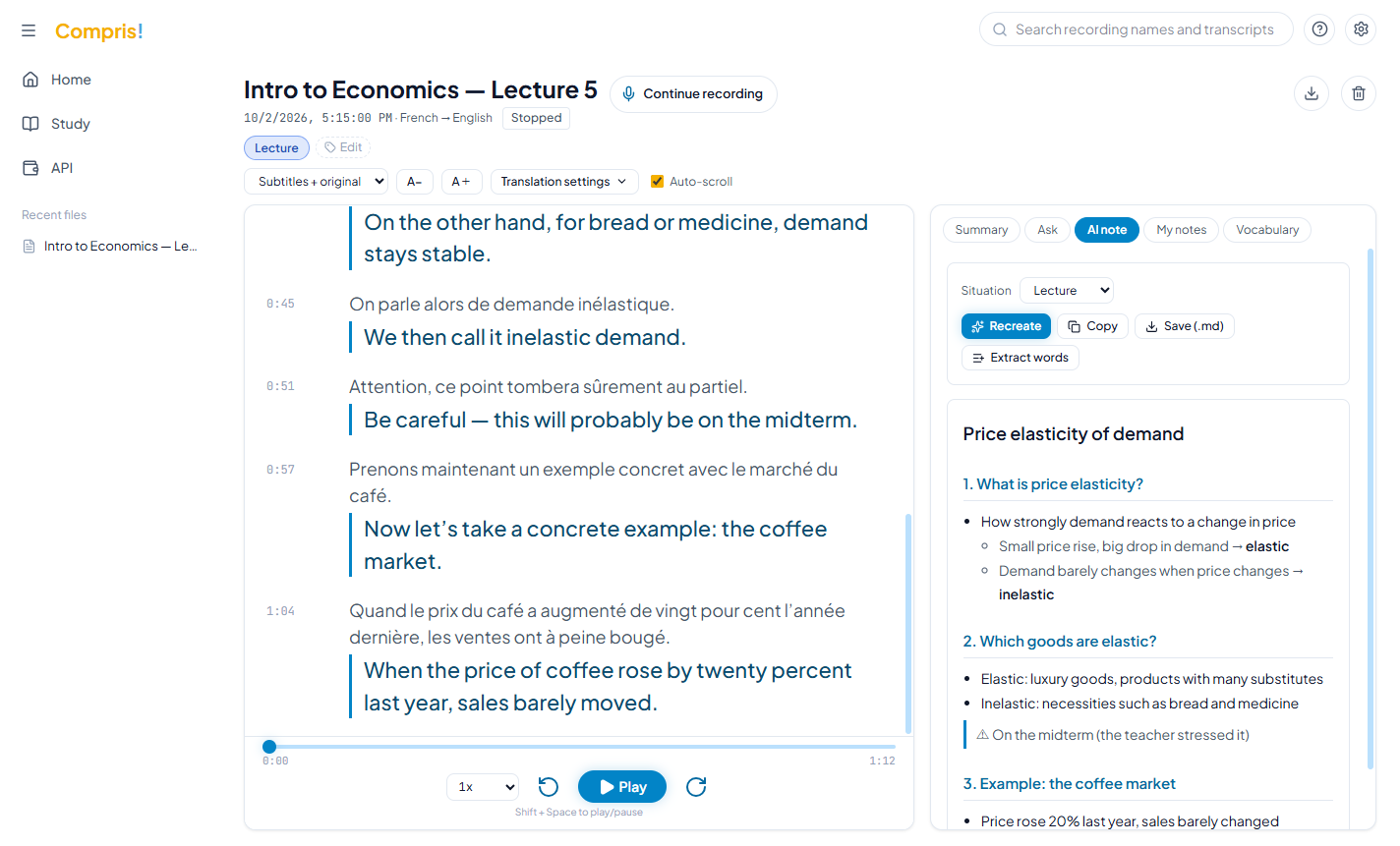
Subtitle Zoom, Teams and YouTube classes straight from your PC’s audio. Translate with the AI you already use.
 Zoom
Zoom
 Teams
Teams
 Meet
Meet
 YouTube
 Gemini
 Claude
Others charge you every year.
Compris! is a one-time purchase.
$0 in months you don’t use it. At 7–8 hours of classes a week, AI API costs are almost free for the first year.
- Real-time translation costs extra on top of a paid plan
- You pay even in months you don’t use it
- Buy once, use it for good
- Try it free for 7 days first (counted from your first recording)
- You pay AI API fees only for what you use. $0 in months you don’t use it
- Almost free API costs for the first year at 7–8 hours of classes a week (Deepgram’s $200 free credit and Gemini’s free tier)
- Real-time translation, vocabulary and quizzes all included
- You need to buy a dedicated recorder
- Heavy use needs an extra annual plan
Want to buy right away (for work, as a gift, etc.)? Buy here. We recommend trying it free first to make sure it works for you.
* Other services’ prices are estimates based on typical public prices as of October 2026. The early-bird price may end or change without notice. “Almost free for the first year” assumes 7–8 hours of classes a week using Deepgram’s free credit ($200) and Gemini’s free tier. After the free credit runs out, expect roughly $7–$14 a month for a few classes a week. You pay AI fees directly to the AI services you register (such as Gemini), only for what you use.
All this from a single class.
Subtitles and translation
as they speak.
The moment your teacher speaks, the transcript and translation start flowing. Even fast talkers are easy to follow. Missed something? Just scroll back and read it.
Translate between any two of these seven languages. The app itself is available in the same seven languages.
Online meetings and video lessons, subtitled straight from your PC.
Online classes and meetings on Zoom, Teams or Google Meet, YouTube and lecture videos too. Just choose “PC audio” when you start recording, and Compris! transcribes and translates whatever is playing on your PC. No microphone in between, so no classroom chatter or background noise — just clear subtitles.
ZoomTeamsMeetYouTubeLost in class?
Ask the AI right there.
When something doesn’t click, ask the AI without stopping the lecture. It answers in your language, based on everything said so far. After class, a summary and AI notes are ready automatically.
A little every day,
and it sticks.
Vocabulary cards with your teacher’s own voice and review quizzes help you catch more words every class.
Lost for words?
Let Compris speak for you.
In a meeting, you know what you want to say, but the words won’t come. Press “Speak for me” and say it in your own language. Compris translates it and says it out loud in theirs.
Make notes from recorded videos and audio, too
日本語・English・Français・Español・Deutsch・中文・한국어
Save AI notes, your notes and transcripts as PDF — even translated into another language
Your recordings and notes stay on your PC.
Recordings of classes and meetings are personal. Compris! keeps your recordings, transcripts and notes on your own computer instead of storing them on a server in the cloud.
Recordings, transcripts, notes and vocabulary all stay on your PC. No account needed.
The API keys you register are encrypted with a Windows feature so they can only be used on this PC.
For transcription and translation, audio and text go directly to the AI services you registered (such as Deepgram and Gemini) — never through us.
See our Privacy Policy for details.
Your everyday ally.

For international students
- Can’t keep up with how fast lectures go
- Don’t want to miss what’s on the exam
- Want to learn vocabulary right from class

For people working abroad
- Don’t want to lose track of meetings
- Want to share minutes and to-dos right away
- Want to speak up at offices and service counters
Get to “Got it!” in your very next class.
Early bird: one-time $20 / €15. $0 in months you don’t use it, almost free API costs in year one at 7–8 hours a week.
Try it free in your usual class first.